
PDF or Word: which should you send?
Send the file type the job ad or application portal asks for. If it doesn't say, advice differs: some official guides prefer Word (.docx), others PDF, and most systems accept both. We suggest a PDF with real, selectable text, which looks the same on every screen, plus a Word copy for anyone who asks.
Start with what the ad says
The job ad or the application portal decides. The University of Bradford's careers service puts it simply: send your CV the way the recruiter wants it, and read the submission guidelines first. If the upload page lists the file types it accepts, pick one of those.
Most systems take both formats. Greenhouse accepts .pdf, .doc, .docx, .rtf and .txt files. SAP SuccessFactors Recruiting accepts Word, PDF and plain text. The bigger risk is a file that has no real text in it, which no format choice can fix.
When nothing is stated, advice differs. The UK Government's JobHelp service says a .docx file is usually best for an applicant tracking system to read, and Edinburgh Napier University suggests Word unless you are told otherwise. The University of Glasgow advises a PDF. Germany's Federal Employment Agency recommends one PDF for email applications, because it keeps your formatting as you made it.
Our view: if the ad doesn't say, send a PDF with selectable text, and keep a Word copy ready for anyone who asks.
| Situation | What to send |
|---|---|
| The ad or portal names a format | That format |
| A recruitment agency asks for Word | A .docx file |
| The portal accepts both | A PDF with selectable text |
| You email an employer and nothing is stated | A PDF with selectable text |
| You email a German employer | One PDF with your cover letter, CV and certificates |
When to send Word
- The ad or portal asks for it. This overrides everything else on this page.
- A recruitment agency asks for it. Agencies may put your CV into their own branded template before sending it to a client. Documentation for TrackerRMS, a recruitment agency system, calls a Word document the most common format for these agency CVs, with the agency's header and footer and your personal contact details removed. Ask to see the version they send in your name.
- An adviser or service you trust prefers it. Some careers services, including JobHelp and Edinburgh Napier University, suggest Word by default.
When PDF is the better choice
- Your layout stays the same. A PDF shows the same fonts, spacing and page breaks on the reader's screen as on yours. That is the reason Germany's Federal Employment Agency gives for using PDF.
- The fonts travel with the file. A PDF can carry its fonts inside it. The archival PDF/A standard requires this, so the file doesn't depend on fonts installed on the reader's computer.
- Some job boards convert to PDF anyway. Indeed converts an uploaded CV into a PDF automatically.
What makes a PDF readable
A PDF can hold real text or only a picture of text. Software can read the first. It may read nothing from the second.
- Selectable text. Export the PDF from the document you wrote it in. A scan or a photo saved as a PDF has no text layer. Greenhouse lists CVs uploaded as an image among the reasons a CV can't be read into fields, and Indeed advises against scanning or photographing your CV. If a scan is all you have, optical character recognition (OCR) can turn it into text you can search and copy, as Adobe describes. Check every line afterwards.
- Embedded fonts. If letters look wrong when you open the file on another device, a font may be missing from the file. Export it again from the original document.
- Contact details as text. Greenhouse lists contact details in a header, footer or text box as a cause of parsing problems. Keep your name, email and phone number in the main body.
Our ATS-friendly CV checklist has a one-minute test for all of this.
How to name your file
Use your name and the word CV, joined with hyphens:
- CV: Grace‑Owusu‑CV.pdf
- Cover letter: Grace-Owusu-Cover-Letter.pdf
- By email, with the role: Grace-Owusu-CV-Office-Coordinator.pdf
Edinburgh Napier University advises labelling files before you attach them, with your name, "CV", the role and the employer. Germany's Federal Employment Agency asks for a meaningful file name. Avoid names like CV-final-v3.pdf or scan001.pdf, which tell the reader nothing. If the ad gives a naming rule, follow it.
File size limits
Each portal sets its own limit, so read the upload page. Greenhouse, for example, accepts uploads up to 100 MB but can't read a CV larger than 2.5 MB into its fields. For email applications, Germany's Federal Employment Agency says 2 to 3 MB in total is safe when the employer gives no limit.
If your file is close to a limit, look for a big photo, a background image or scanned pages, and remove or shrink them.
Emailing or uploading
Uploading to a portal
Many portals read your file and fill in parts of the form for you. Check every field before you submit, because dates and job titles can land in the wrong place. Answer any screening questions carefully. Our guide to what an applicant tracking system is explains what happens next.
Sending by email
- Attach your CV and cover letter as files, as the University of Bradford advises, rather than pasting the letter into the email.
- Write a short, formal message that names the job and says what is attached.
- Send it from a professional-sounding email address.
- Email it to yourself first to check how it looks, as Edinburgh Napier University suggests.
A worked example
Kofi Asante, a fictional customer service adviser, sends three applications in one week.
| Application | What the ad says | What Kofi sends |
|---|---|---|
| A retailer's careers portal | "Upload your CV (PDF, DOC or DOCX, max 2 MB)" | Kofi-Asante-CV.pdf, 180 KB, with selectable text. He checks the fields the portal fills in and corrects one job title. |
| A recruitment agency | "Please send your CV in Word format" | Kofi-Asante-CV.docx. He copies the text from his PDF into Word, fixes the headings and bullet points, and asks the agency to show him their version before it goes to a client. |
| A small local firm | "Email your CV to the office manager." No format given. | A short email naming the role, with Kofi-Asante-CV-Customer-Service.pdf and his cover letter attached. He sent it to himself first to check. |
Each time, the ad decided the format. Where it didn't, he sent a readable PDF.
Country notes
- United Kingdom. Official and university advice disagrees. JobHelp and Edinburgh Napier University lean to Word, and the University of Glasgow leans to PDF. Follow the ad.
- Germany. For email applications, the Federal Employment Agency advises combining the cover letter, CV and certificates into one PDF, about 2 to 3 MB in total if no limit is given.
- Everywhere. Job boards and portals publish their own rules on the upload page. Those come before any general advice, including ours.
Length, photo and personal details also change by country. Our guide on how to write a CV covers those.
If an employer wants Word
c-v.ai exports PDF only. It doesn't create Word files. Because the PDF contains real, selectable text, you can copy the text into Word or another word processor and save it as a .docx file. Headings, bullet points and spacing may need tidying after you paste, so check the result before you send it.
Every PDF you export from c-v.ai is checked on your iPhone for selectable text, embedded fonts, your name and contact details as text, standard headings and reading order. If something might be misread, the app tells you what and where. "Exported versions" keeps a copy of every PDF exactly as you sent it. Systems differ, so no check can guarantee how a particular employer's software will read your CV.
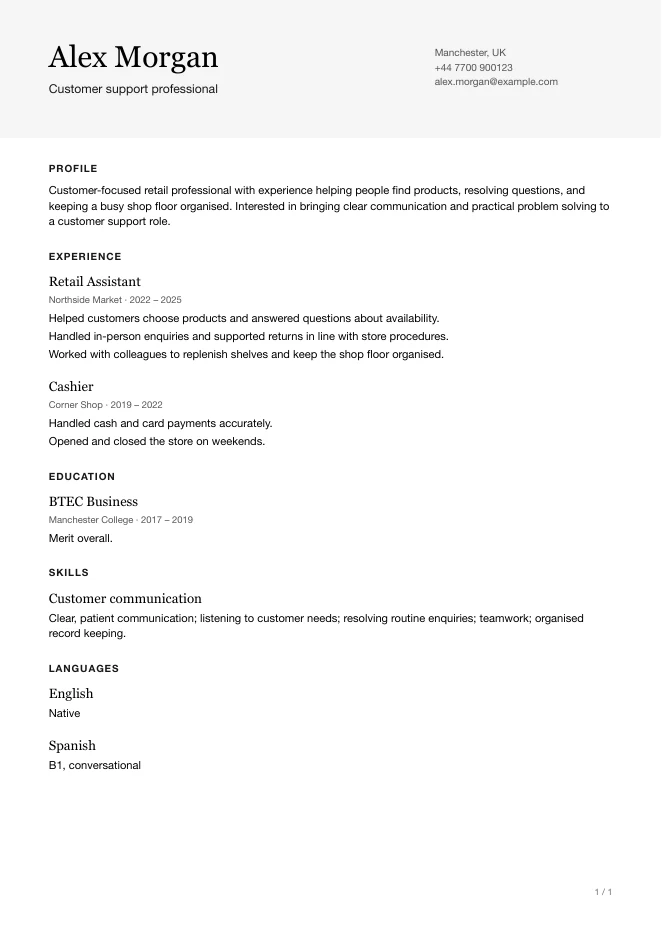 Classic
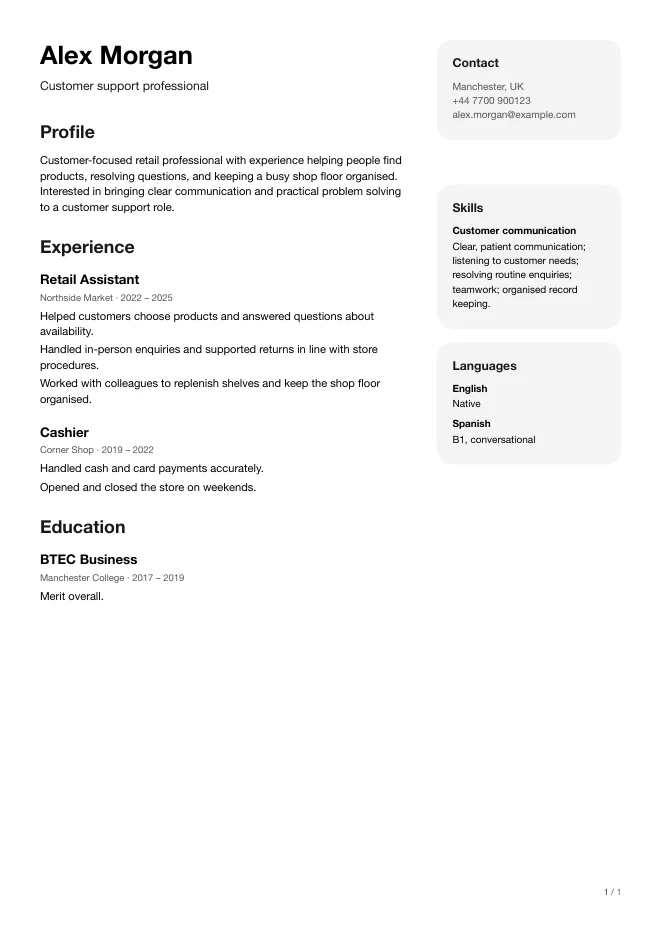 Modern
In c-v.ai your CV comes in six templates, from Classic and Modern to Banner and Timeline, each in six colours on A4 or US Letter.

Questions
Is PDF or Word better for applicant tracking systems?
The systems whose documentation we checked accept both. Greenhouse lists .pdf, .doc and .docx, and SAP SuccessFactors Recruiting accepts Word and PDF. Advice still differs: the UK Government's JobHelp says a .docx file is usually best for an ATS, while the University of Glasgow advises a PDF. Follow the ad, and make sure the file contains real text.
Can I send a scan or a photo of my CV?
Avoid it. Greenhouse lists CVs uploaded as an image among the reasons a CV can't be read into fields, and Indeed advises against scanning or photographing your CV. Send a file made from the document itself.
What should I name my CV file?
Use your name and the word CV, for example Grace-Owusu-CV.pdf. If you are emailing it, you can add the role. If the ad gives a naming rule, follow that instead.
How big can my CV file be?
Each portal sets its own limit, so check the upload page. Greenhouse accepts uploads up to 100 MB but can't read CVs larger than 2.5 MB into fields. For email applications in Germany, the Federal Employment Agency says 2 to 3 MB in total is safe when no limit is given.
Should my cover letter and CV be in one file?
Follow the portal or ad. Many portals have a separate upload for each. For email applications in Germany, the Federal Employment Agency advises one PDF with the cover letter, CV and certificates. Our guide to cover letter format covers the letter itself.
Can c-v.ai export my CV as a Word file?
No. c-v.ai exports PDF only. The PDF has selectable text, so you can copy the text into Word or another word processor and save it as a .docx file if an employer asks for one. Check the layout before you send it.
Sources
- Greenhouse Support: Supported formats for resumes, cover letters and other candidate uploads
- Greenhouse Support: Unsuccessful resume parse
- SAP Support: Attachments type supported, SAP SuccessFactors Recruiting Management
- JobHelp (UK Government): Getting through applicant tracking systems
- University of Glasgow Careers: Skills based CV
- Edinburgh Napier University: CVs and cover letter guide
- University of Bradford Careers: CVs
- Bundesagentur für Arbeit: Bewerbungsarten im Überblick
- TrackerRMS Help: Agency resume/CV template
- Indeed Help Center: Creating a resume on Indeed
- Adobe: How to use OCR software for PDFs
- Library of Congress: PDF/A-1, PDF for Long-term Preservation