
Modern CV template
Modern sets your name in a bold sans-serif and gives your experience, education and profile the main column. Your contact details, skills and languages sit beside them in light grey cards. It comes in six accent colours, on A4 or US Letter, with or without a photo.
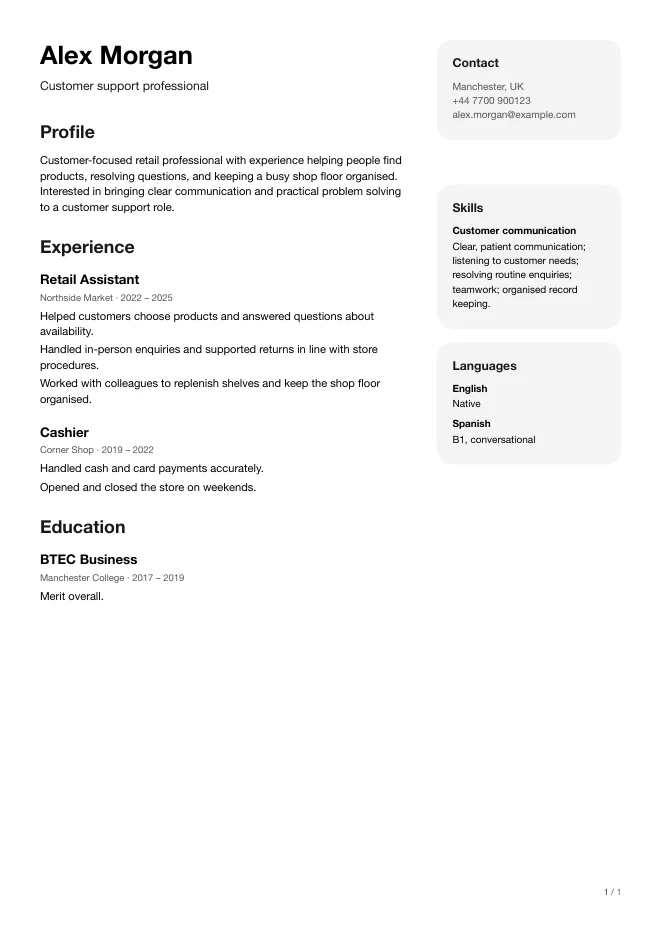
What Modern looks like
- Header: your name in bold Helvetica Neue, with your headline below it in your accent colour.
- Main column: Profile, Experience, Education and any other longer sections, each under a larger heading in your accent colour.
- Sidebar: light grey cards for Contact, then Skills, Languages, Training, Certifications, Interests, Availability and Links, whichever your CV has.
- Entries: bold job and course titles, then the employer or school and dates in a smaller grey line, then your bullet points.
- Page numbers: a small “1 / 2” at the foot of each page.
Colours, paper and photo
- Accent colours: Black, Navy, Teal, Green, Burgundy or Rust, used for your headline, headings and card titles.
- Paper: A4 or US Letter. Long CVs run onto a second page with each entry kept together where possible.
- Photo: optional. It sits to the left of your name. Some countries expect one and others leave it off, so check what is usual where you apply. See CV or résumé.
How the sidebar is read
Applicant tracking systems read a PDF’s text in an order they work out from the layout, and a sidebar can get mixed into the column beside it. Modern places its cards so that the text reads between sections, never in the middle of a job.
Each PDF is then checked on your iPhone: selectable text in embedded fonts, your name and contact details as text, every heading on its own line, and each job read in one piece. If a particular CV might be read out of order, the app says what was read where, for example “Skills is read in the middle of Experience”, so you can fix it. Systems differ, so no result is guaranteed. Read about the readability check.
Questions
Is the Modern template free?
Yes. All six templates, all six colours, both paper sizes and the photo option are free. AI features are in Plus or the one-off purchase for a single CV. See pricing.
Which sections go in the sidebar?
Skills, Languages, Training, Certifications, Interests, Availability and Links, along with your contact details. Everything else, including Experience, Education, Projects and Volunteering, stays in the main column.
Can I switch to Classic later?
Yes. The design is saved with each CV. Switch the template, colour or paper size at any time and the PDF updates without retyping anything.
Is there a matching cover letter?
Yes. A cover letter you write in c-v.ai uses the same template, colour and paper size as its CV. See the cover letter builder.